Home, Family & Weather apps and guides
Between a household repair and the next family reminder, I need the right tool, not another dashboard. I collect home improvement and home security helpers here alongside resident and daily-routine apps.
7 apps · 3 guides · top pick first
See the top pickHome, Family & Weather: the shortlist
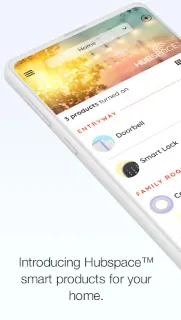
Hubspace or a Weather App? Pick the Right Home Helper
I’ll sort five apps by the job they actually do, so you can start with the right one before changing your evening routine.
- Hubspace Best for organizing and controlling compatible smart products by room.
- Zoom Earth Best for checking rain and broader weather conditions before changing plans.
- CarMax Best for browsing used cars, SUVs and trucks.
- Athan Best for keeping prayer times and Islamic practice tools together.
- Deepsearch AI Search Best for searching people’s public data when that is the specific task.
Apps for household jobs and everyday routines
 AthanAndroidOur top pickCheck prayer times and Qibla together, then save audio for when reception allows.
 HubspaceAndroidGroup compatible devices, set schedules and adjust them from your phone.
 RentCafe ResidentAndroidPay rent, follow repairs and manage resident tasks through your community portal.
 Deepsearch AI SearchAndroidSearch a name or username for public profiles, records, images and videos.
 CarMaxAndroidSave cars, compare details and plan a test drive from a single shortlist.
 Weather KittyAndroidPlan around rain, wind and a forecast-matched cat, with privacy choices to review.
 Zoom EarthAndroidFollow rain, wind and storm systems on a world map before they reach your plans.
Home, Family & Weather guides


Other categories
How we pick Home, Family & Weather apps
I ask what household job an app owns, whether it depends on a particular property or connected device and whether another family member can use it appropriately. A resident portal is only useful for a participating property; a connected-home app needs compatible equipment. I keep home improvement tasks separate from daily reminders so the shelf stays useful even when the apps have little in common. My final question is simple: would I know which app to open when that particular household job comes up?
Home, Family & Weather FAQ
Can I use a resident app for any rental property?
I check with the property team before creating an account. Resident services generally depend on the property using that platform.
Do I need connected devices to use a home-control app?
For controlling lights or other equipment, I check the app’s compatible-device requirements first. A phone app alone cannot add connected controls to ordinary household equipment.
Should everyone at home share one account?
I prefer separate household access where an app supports it. That lets me choose appropriate permissions without passing around the main account credentials.