The full review

A school message is the email I want to find while newsletters are the emails competing for my attention. That is the Gmail problem I care about: not sending more mail, but spotting the message that changes the afternoon without replying from the wrong address. I judge the Android app on account separation, search, and the difference between adding an account and choosing a send-as address. My less obvious finding is that the most convenient screen, All inboxes, is not necessarily the best place to start a reply.
Part 1 · 1 of 3I separate accounts before I combine inboxes
I start with the profile picture at the top right, then Add another account. Gmail supports accounts from different providers, so a personal inbox and business email can live in the same app. I prefer to check each account separately first: the school address should feel distinct from the address that receives client requests and newsletters about work.
All inboxes, available through the navigation menu, is useful for a quick sweep across accounts. I treat it as a viewing convenience, not a merged identity. Each message still belongs to its original account. Before composing anything sensitive or time-critical, I switch into the intended inbox; that small pause matters more to me than seeing everything together.
Part 1 · 2 of 3The school message needs a search, not another scroll
A newsletter-heavy inbox makes scrolling an unreliable way to find real mail. I would search for the school name and a distinctive word such as permission rather than trust my memory of where the message appeared. Gmail supports search operators too: from: narrows the sender, while has:attachment helps when the missing item is a form rather than a conversation.
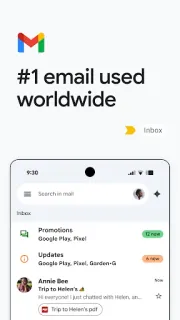
Categories can help in Gmail accounts, but I would not mistake Primary for a complete list of important messages. A useful newsletter may land in Promotions, and a school service can send mail that looks automated. I use categories to reduce visual clutter, then search when something specific matters. The next job is reducing the repeat clutter itself.
Part 1 · 3 of 3An extra inbox is not an extra From address
The distinction I would check before moving my routine into Gmail is account versus send-as address. Adding another account gives the app another mailbox to access. A send-as address is an identity configured for sending through an account; it need not provide a separate inbox. That matters when a club address forwards into personal mail but replies should represent the club.
For a Gmail account, I would set up an alternate sending address through Gmail on the web, under Settings, See all settings, Accounts and Import, then Send mail as. Verification is part of that process. On Android, I check the From field when composing or replying and select the configured address where available. I treat mailbox access and sending identity as separate setup tasks.
Several addresses fit; invisible boundaries do not
I recommend Gmail for someone whose newsletters, family messages, and work correspondence arrive at several addresses but need attention on one phone. Search and account switching are the strongest reasons to choose it. I would look elsewhere if strict separation means separate app icons and no combined inbox at all. Gmail can keep accounts distinct, but it also makes combining their view easy. For a shared role address, I would confirm the sending setup before relying on it.
The listing, as we read it
- Developer
- Google LLC
- Version
- Varies with device
- Updated
- Nov 5, 2026
- Installs
- 10,000,000,000+
- Rating
- 4.1 out of 5
- Content rating
- Everyone
- Category
- Communication
- On Google Play since
- Sep 21, 2010
- Price
- Free
- In-app purchases
- No
- Ads
- Yes
Source: Google Play listing for com.google.android.gm · read Nov 9, 2026
Google LLC publishes Gmail, and the Google Play listing flags ads and free installation. I read those as separate considerations: getting the app is free, but an inbox can still contain advertising. The optional Gemini features described in the listing require an eligible paid Google plan and an internet connection.
The update notes emphasize chat, spaces, and voice or video calls alongside email. I read that as a collaboration direction, not a promise that newsletters will become easier to sort. For this inbox problem, multiple-account support, search, and the listed unsubscribe tools are the more relevant capabilities.
The controls I would check before trusting a busy inbox
Part 2 · 1 of 4Notifications should follow the account, not the noise
I open Settings and select an account before adjusting notifications. For a Gmail account, High priority only can reduce interruptions, but it is a judgment made by the app rather than a personal guarantee. If school messages are essential, I would keep broader alerts initially and tackle unwanted subscriptions instead of assuming Gmail already knows which senders matter.
I also review swipe actions in General settings. Archive is useful for a message I have dealt with but may need again; it removes the Inbox label without discarding the conversation. For newsletters I never read, archiving only hides today's clutter. I prefer unsubscribing from recognizable mailing lists, reserving Report spam for unwanted or suspicious mail rather than every subscription I regret.
Part 2 · 2 of 4A reply address deserves its own check
A personal address beneath a club reply can create confusion even when the message itself is correct. I would not assume that the address receiving forwarded mail becomes the reply identity automatically. Send-as settings and reply behavior deserve attention on the web, followed by a check of the From field on Android. The recipient line is only half the check.
Work or school accounts can have administrator-controlled restrictions, and another provider's sending arrangements may differ from Gmail's. I treat an alternate address as something to verify, not a cosmetic label I can freely type. For invoicing correspondence, for example, I want the established work identity visible before sending. That check remains necessary even when the message is easy to find.
Part 2 · 3 of 4My newsletter triage ends with a deliberately chosen reply
My preferred sequence is to open the relevant account, search for the expected sender, and handle that conversation before browsing newsletters. I might star a message that needs attention later, but a star is not a deadline reminder. If the email contains a collection time, I would put that commitment in my calendar rather than leave the inbox to remember it.
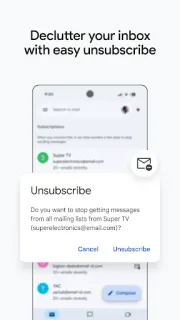
Next I clear recognizable subscriptions I no longer want, using Unsubscribe where Gmail offers it. I avoid opening links in suspicious messages just to reduce clutter. Finally, I return to the chosen account for outgoing mail and inspect From. This is modest project management for household correspondence: find the action, put it somewhere dependable, and keep the reply identity deliberate.
Part 2 · 4 of 4One app reduces switching, not every kind of friction
Separate email apps make account boundaries more visible: opening a different icon can be a useful cue that I am speaking for work rather than family. Gmail trades that cue for convenient switching and a combined view. I favor its approach when I need frequent access to several inboxes, provided I keep the account avatar and From field in my routine.
Gmail on the web remains the better companion for initial send-as configuration and filters that route recurring newsletters. Android is where I would read, search, and answer. The update's video conferencing and group collaboration tools may be useful for work, but I would not make them the reason to choose this app. My deciding factor is whether ordinary correspondence stays findable.
I would keep Gmail, but give each address a boundary
Gmail's value here is practical: I can reach several accounts, find buried details, and reduce recurring newsletter clutter without treating every message as equally urgent. I would start with separate account views and use All inboxes for a sweep.
The caveat is identity. A tidy inbox cannot prevent a reply from the wrong address. Once send-as is configured and the From check becomes routine, Gmail makes more sense as a family-and-work mail hub.
What I like
- Multiple providers accessible in one app
- Search helps recover buried correspondence
- Combined or account-specific inbox views
- Configured alternate sending identities supported
What I'd change
- Combined views weaken visual account boundaries
- Send-as setup needs attention on the web
- Priority alerts cannot guarantee importance
Gmail FAQ
Can I see several accounts together?
Yes. I use All inboxes in the navigation menu for a combined view, then switch accounts when I want a clearer boundary.
Does adding an account create a send-as address?
No. I distinguish mailbox access from a configured alternate sending identity. For Gmail, I set up Send mail as on the web.
Can I reply from an alternate address on Android?
Configured sending addresses can be available in the From selector. I check that field on the actual reply rather than assume it follows the incoming address.
How would I stop newsletters burying school mail?
I would unsubscribe from familiar lists I no longer read and search for the school sender directly. I would also check beyond Primary when an expected message is missing.
Does archiving delete a message?
No. Archive removes it from the inbox, while the message remains searchable and accessible in All Mail. I use it for finished correspondence I may need again.
 TipsGmail
 Best picksHubspace