The full review
The picnic bag is by the door, but the weekend route still has a loose end: lunch, a woodland walk, and somewhere to stop before the children get restless. That is where I want Google Maps to earn its place—not just by reaching the final destination, but by keeping the stops manageable when reception fades. I judge it here as a road-trip companion for planning, driving, and changing course. My less obvious finding is that saving places and arranging stops are separate jobs; treating them as interchangeable makes a carefully planned afternoon surprisingly fragile.
Part 1 · 1 of 3Save the countryside, not just the cottage
I start with the whole outing on screen: home, the lunch village, the walk, and the overnight stop. From the profile menu, Offline maps lets me select an area to keep on the phone. I want that rectangle to cover the roads between destinations, not merely the places themselves. A scenic detour is little comfort if it takes me beyond the saved coverage.
I do this over Wi-Fi before packing, with enough free storage for the selected area. Offline maps are a fallback for driving directions, not a copy of everything available online. For my weekend plan, that means keeping addresses and checking opening hours ahead of time too. The useful question is not simply whether the destination fits, but whether the alternative road fits beside it.
Part 1 · 2 of 3Lunch belongs in the route, not in my memory
For the driving itinerary, I open Directions, choose the final destination, and use Add stop in the route menu. I then drag the stops into the order I actually want to visit them. A bakery before the trailhead makes sense; the same bakery after the walk may mean arriving too late. I treat the displayed route as a sequence to inspect, rather than an automatically perfected day out.
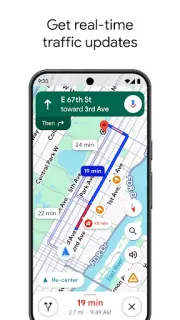
While connected, traffic information and automatic rerouting help the driving portion respond to incidents and closures. They cannot decide whether lunch matters more than the viewpoint. I still need to judge the order, the detours, and how much time each visit deserves. Before starting navigation, I scan the whole line for an accidental return through the same village—the kind of mistake a plausible arrival estimate can disguise.
Part 1 · 3 of 3The entrance can matter more than the destination
A country park's name is not always the most useful endpoint. I look for its visitor car park, then use Street View where available to inspect the approach and entrance. Photos and place information can help distinguish the picnic area from the walking start. This matters most on a multi-stop afternoon, when a wrong entrance quietly turns a short visit into another drive.
I save appealing alternatives in a custom list: a covered lunch option, a shorter walk, or a nearby shop. That list is my reserve bench, not the active route. Sharing it gives another adult the same pool of ideas without pretending every place is a commitment. If the weather changes, I can choose a substitute deliberately and then revise the driving stops.
A flexible afternoon suits Maps better than a timed tour
I would choose Google Maps for a weekend with a handful of meaningful stops, especially when I want place research and driving directions together. It works well as my trip planner when I am willing to arrange the sequence myself. I would look elsewhere for automatic stop-order optimisation or a detailed timetable that accounts for every visit. Those are different jobs from getting me along a chosen chain of destinations, which is the task Maps handles most convincingly.
The listing, as we read it
- Developer
- Google LLC
- Version
- Varies with device
- Updated
- Nov 4, 2026
- Installs
- 10,000,000,000+
- Rating
- 3.4 out of 5
- Content rating
- Everyone
- Category
- Travel & Local
- Price
- Free
- In-app purchases
- No
- Ads
- Yes
Source: Google Play listing for com.google.android.apps.maps · read Nov 9, 2026
Google LLC publishes Google Maps, and the Google Play listing flags ads and free installation. I read the local suggestions as useful starting points, not a promise that the first restaurant shown is the right lunch stop. For this itinerary, I weigh its location, photos, and practical details against the detour it creates.
The release notes describe bug fixes supporting discovery and navigation. I take that as maintenance rather than a new road-trip feature to reorganise my plans around. The relevant foundations remain offline areas, saved lists, and driving directions; I would keep my attention on preparing those before departure.

Where a multi-stop weekend needs extra preparation
Part 2 · 1 of 4Check tolls before trusting the scenic-looking line
In Route options, I check the choices for avoiding tolls, motorways, or ferries against the actual weekend plan. Avoiding motorways can suit a leisurely outing, but I would not assume it produces a prettier or easier drive. I compare the alternatives on the map before accepting one. A narrow-looking shortcut deserves attention when the car is full and lunch has a closing time.
Fuel-efficient route options are also worth considering where available, although I keep the stop sequence as my first concern. A sensible route between poorly ordered stops is still a poor itinerary. I check these preferences again when the journey changes substantially, especially if an airport pickup has become the opening stop and arriving reliably matters more than taking back roads.
Part 2 · 2 of 4Offline driving loses the live picture
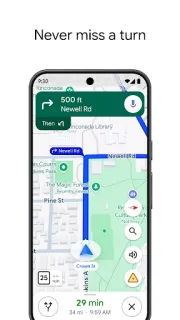
The strongest reason I prepare offline areas is straightforward: driving navigation can work without mobile reception when the necessary route is within the saved coverage. The important trade-off is that offline driving lacks live traffic and alternative routes. I would not expect it to react to a fresh queue as connected navigation can. That distinction matters when the afternoon already has several commitments.
I also avoid treating offline maps as an offline directory of every useful detail. Before leaving, I check the trail car park, lunch hours, and any reservation information I need. Offline walking, cycling, and public transport directions are not available, so the saved driving area is not my plan for following a woodland trail. Reaching the walk and navigating the walk need separate preparation.
Part 2 · 3 of 4Build the route after choosing the fallback stops
My preferred workflow begins with discovery rather than navigation. I collect the lunch place, walk, overnight address, and rainy-day alternative in a saved list. Then I inspect the entrances and pick the places I actually intend to visit. Only those become stops in Directions. This keeps an attractive suggestion from silently becoming an obligation, and leaves the backup visible without sending the car there.
Next I arrange the stops, inspect the entire route, and select offline coverage around that corridor. If the weekend starts with car rental, I use the collection location as the real starting point rather than assuming the terminal and vehicle pickup are together. Before departure, I reopen the itinerary and check the sequence. I want the next destination to be a conscious choice, not yesterday's unfinished idea.
Part 2 · 4 of 4One long route or separate legs? I use both deliberately
A multi-stop route gives me the clearest overview of the planned driving. I can see whether lunch pulls the trip away from the walk, or whether the overnight stop sits naturally at the end. Its weakness is that the sequence can look more settled than the day really is. I do not read the driving estimate as a schedule that includes eating, exploring, and finding everyone’s coats.
Separate directions for each leg make sense when the next activity depends on weather or energy. The cost is losing that whole-day overview and repeatedly choosing the next destination. My compromise is to plan the complete sequence first, keep the candidates in a shared list, and reassess while parked. That preserves the shape of the weekend without making a tired child compete with a fixed itinerary.
My choice for a route I am willing to organise
What wins me over is the connection between finding a useful place and getting there. A car park, lunch stop, and fallback activity can live close to the driving plan without requiring a separate planning system.
My reservation is about expectations. I still own the order, the timing, and the decision to skip something. With that understood, Maps feels like a helpful road companion rather than an itinerary manager I have to second-guess.
What I like
- Driving stops can be reordered to match the day.
- Offline areas provide a useful driving fallback.
- Shared lists keep optional stops together.
- Street View helps with entrance checks.
What I'd change
- Stop order needs manual judgement.
- Offline driving lacks live traffic and alternatives.
- Driving estimates do not budget time at stops.
Google Maps FAQ
Can I use a multi-stop trip without reception?
I prepare coverage for the whole driving route beforehand. Offline driving is supported within saved coverage, but I set up and inspect the itinerary before losing reception.
Will Maps put my stops in the best order?
I arrange the sequence myself using Add stop and the reorder controls. I would not rely on Maps to optimise a day of visits automatically.
Does a saved list become a driving route?
No. I use lists to collect places, then add the chosen destinations to Directions.
How much countryside should I save offline?
I include the connecting roads and room for plausible detours. Saving only the destination area can leave part of the journey outside coverage.
Will the arrival estimate include our picnic?
I treat it as a driving estimate, not a full-day timetable. I allow time for meals, walks, parking, and getting back into the car separately.
 CompareMarineTraffic
 CompareAirbnb
 How-toParkNYC powered by

 CompareSaily